Showing posts with label AdSense. Show all posts

How To Insert Adsense Ads In Blogger Post

This will explain how to Embedd adsense ads in between posts body.
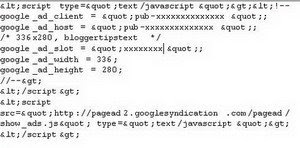
1.Generate Parsed code for adsense code because we cannot put adsense code directly in the xml.So parse it using AdParser.
2.After parsing,your ad code Should look like this.


How To Place ad above or below your post header
log in to your dashboard--> layout- -> Edit HTML
Click on "Expand Widget Template" and  scroll down  to where you see this:-
<div class='post-header-line-1'/>
To place ad above your post header.Paste the code above this line.
To place ad below your post header.Paste the code below this line.
How To Place ad end of your post body

log in to your dashboard--> layout- -> Edit HTML
Click on "Expand Widget Template" and  scroll down  to where you see this:-
<p><data:post.body/></p>

Paste the code below this line, to show your ad at the end of your post.

NOTE : To Set the Align of your ad , Insert your code like this.
<p align="center"> Your Ad code
</p>


Replace "
center" with "left" or "right" for desired alignment.

How to Embed Adsense add unit in Left or Right corner of post content

This will explain How to Embed Adsense add unit in Left or Right corner of post content.
Generate Parsed code for adsense code because we cannot put adsense code directly in the xml.So parse it using AdParser.
After parsing,your ad code Should look like this.


1.Log in to your dashboard--> layout- -> Edit HTML
2.Click on "Expand Widget Templates"
3.Scroll down to where you see this:-
<div class='post-header-line-1'/>
4.To place ad Top left corner of your post ,Paste the below code, below of above line.
<div style=”display:block;float:left;margin: 0px 10px 0px 0px;”>
Your Adsense Parsed code
</div>


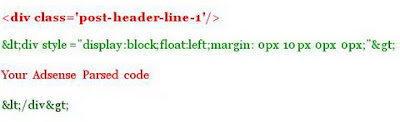
Attention :  We can't put "<div style=”display:block;float:left;margin: 0px 10px 0px 0px;”>" and "</div>" directly in the xml.So we must generate Parsed code for these code using AdParser.
So Final Code you have to copy below the line "<div class='post-header-line-1'/>" ,look like this.

If you Want To place ad Top Right corner of your post,Replace "left" with "right".
5.Click on "Save Templates" and Refresh your site.

How To Remove Low paying Adsense Ads

To increase your Adsense Earnings by removing the lowpaying adsense ads from your account,follow the steps below.

1.First go to www.adsblacklist.com .


2.Now Signup for a account.it's free and very simple.

3.Now login to your account.

4.Now Click on My Account.


5.Now click on 'Add New Domain'


4.Submit your URL,TITLE and Keywords.Look at the example below.


5.Now go to Generate Filter List.


6.Drag and drop your domain name into 'Keywords from selected domains:' box.Then you can see keywords,you give in step 4.

7.Now select 'MFA' and 'LCPC'.


8.Now click on Submit.

9.They will give you lowpaying ads urls.copy these urls.

10.Now login to your Google Adsense Account.

11.Click AdSense Setup.


12.Go to Competitive Ad Filter category.


13.Paste lowpaying ads urls into the box and click save changes.


14.Now google will not display low paying ads in your site.

Code To Show Advertisements Only On Homepage Or On Particular Post Page

Displaying Different Ads on Homepage and Individual Blog Posts
Displaying similar ads on all pages including homepage results in reduced clicks and low CTR (tips to increase CTR). Low CTR definitely means less revenue generation through AdSense. It is a good idea to display different set of ads on different posts to keep the visitor hooked to your blogs. A user can easily display new ads on your homepage and individual posts on both blogger and WordPress blogs.
A user is required to use some Conditional Tags along with the advertisement code. A single condition tag can be used to display ads on your homepage only, and another tag can be used to display ads for all your posts. This allows showcasing different ads for homepage and your posts.
A square banner of size 336*280 and 300*250 can be used to display ads for your posts. If a user wishes to display different ads for every single post, they can do so by adding a new Condition tag.
Steps to display ads on your individual posts and homepage on blogger:
To display ads only on your homepage, change the ad code as follows:
<B:if.cond=’data:blog.pagetype !=&quot;item&quot;’> your advertisement code </B.if>
To display ads on your individual posts, change the ad code as follows:
<B:if.cond=’data:blog.pagetype ==&quot;item&quot;’> your advertisement code </B.if>
Steps to display ads on individual posts and homepage on wordpress blogs:
To display ads only on your homepage, change the ad code as follows:
<?Php if (is_home()).{ ?>
your advertisement code
<?Php “ ?>
To display ads on your individual posts, change the ad code as follows:
<?Php if (is_single()).{ ?>
your advertisement code
<?Php “ ?>
Substitute your advertisement code with your AdSense advertisement code. If a user wishes to display same advertisements in all pages including homepage, then a user will have to remove the condition tags.

What Can I Do If Someone Is Copying My Blogs Content To Stop Them Copying

Stop Your Blog Post of copied content
There are thousands of people trying to earn money through blogs and INSTEAD makes it unique and your own you are trying to fool someone in the mail the other copy for their own blogs. You do not really understand they are a joke to complete, but also harmful to their own success.
This work will be done mainly by amateur bloggers, unprofessional and naive. It is meant to clear light that they are a beginner, as they employed Copy and Paste to copy the contents of the RSS to do instead.
If someone gives a link forwarded to your website that they copied from a paragraph and it is fine. Where instead of when someone copies the entire post to your blog so that you can do something much worse blogger. If other bloggers, use the reference content, you want to write a post about him, it would not be a problem, but the problem is naive These bloggers do it differently. Copy and paste the full content, without a single word! What they do not understand is not an act takes advantage and stick to them in the long run! Remember, gentle and polite when you always go to ruin their bill.
As a first warning letter to electronic bloggers request that copies of deleted messages. Then wait a week. After a control week, the bloggers your request and did what he was told to do. If your goal is so, then you have usually keep for your patience and did write another, but this last letter to bloggers. This time you should be hard and the danger that to mention only a few people that take feasible measures for the ban on behalf of more historical.
Keep your patience the last time and wait another week. Basically, it works the second e-mail most of the time they do not try to spoil. Check the bloggers copied the contents were deleted or not. If not, then it is time to act.
Now you have two options for accounting fraud forever destroy either by banning Adsense ID history and remove his blog on all search engines.

This should be considered formally to:
1> Report spam to Google: As we all know that Google is the mother of search engines it is best, so as to leave Google. It is made by a simple process. You need to fill a few boxes and send it to Google. Less than a month to index the pages deleted. All traffic, excluding the value of the blog will be zero.
2> Report spam Yahoo! yahoo finished second, holding a strong position behind Google. So you can also report on the Yahoo team serious action against these things. If you do not then you need to open a Yahoo account for this problem report.
3> AdSense Team: This is an important step because most bloggers have taken to the bloggers to make money from their blog post. If you report it to Google Adsense to drown their dreams as nothing. Google will pay money to the top of the right blogs and is one of the best programs Adsense.
4> Report the problem to Blogger: When is the blogspot blog, then you can just delete this blog from the blogger. There are two ways to block this blog. One thing we can activate the option flag this blog. Second, you can also link to the report as spam
Here are some steps to take. Not that on one of the above-mentioned report dog blog search engines that you have copied the entire report as spam as long as you need. The most important thing is not, so keep your messages Withdrawal Have Been copied you and give all rights to knowledge about the imitators.

Twitter Delicious Facebook Digg Stumbleupon Favorites More

 
Design by Free WordPress Themes | Bloggerized by Lasantha - Premium Blogger Themes | fantastic sams coupons