Showing posts with label blogger. Show all posts

23 Free High Quality Social Media Icons Sets

This is my second high quality social bookmark icons colletion.You can read my previous article here.I found these beautiful clean social bookmarks icon when surfing the web.And I think to share these icons with you.So I listed below over 20 new high quality social media icons sets for you.

1 . 27 Circular Social Media Icons in 3 Sizes

I have put a very big emphasis on function in these icons with the right amount of details. There is also an icon template PSD file included!

I was compelled to design these icons when through searching the web I couldn’t find a suitable set of simple, circular social media icons. What kind of age are we living in when you cannot find a good set of simple, sleek, circular social media icons? So here they are.

-From Designer


2 . A Life in Pixels

In this freebie icon set, you will find 16 free social media icons for sites that designers appreciate (such as deviantART, Flickr, Twitter, and more). This free icon set is called A Life in Pixels and is inspired by Minimalist design philosophies.

The set includes 16 32px x 32px PNG files. They are monochromatic and can work with many other colors, which is perfect if you are looking for icons that are subtle and muted so that they do not dominate your design.


3 . Free Social Media Bookmark Icon pack

Hate or love social media sites, they do bring you visitors to your site and the best way to do that is to show them what websites you are supporting. So I’ve designed the first 14 social media bookmark icons that you can download and use wherever you like, for free as well!


4 . Free glossy social icons

Here’s another free icon set for you. Glossy social is an icon set which consists of 20 icons for the following services: YouTube, Twitter, Digg, StumbleUpon, Flickr, RSS, Feedburner, Skype, Last.fm, Gmail, Linkedin, Yahoo, Facebook, Delicious, mySpace, reddit, Friendfeed, Wordpress, Vimeo and a generic “Favorite” icon.


5 . Free Set of Social Media Icons – Rivet Social

The result is a set of 14 riveted brushed steel icons that not only include the basics but DesignBump, DesignMoo, and DesignFloat as well! You’ll find 14 different 64px x 64px icons in this set in .jpg format.


6 . Free Vectors Icon Sets

Here’s some more free vectors! There in color, and black and white, and they retain there ‘coolness’ when resized. There simple, clean icons, which I hope you enjoy!.Below are the color versions of the icons.


7 . Function Icons Set

They are only available in 48×48px. These free icons are exactly that, free! You can use them anywhere.Included some of the main Social Media Icons such as: Design Float, Digg, Delicious, Furl, Technorati, Flickr, Stumble Upon, Twitter & Many more…


8 . Google and Facebook

The items are for your personal use only. Do not modify or redistribute any contents of the available packages without permission. If you plan on using these icons in a project of yours (freeware or otherwise), please contact the authour before doing so.


9 . Google Tango Icon Set 2

Great Google Tango PNG icons for your collection.
Quality : PNG quality
Format of collection *.zip (archive)


10 . Matte White Square Social Icons

108 Matte White Square Social Networking/ Social Media Icons 512px * 512px.
Free for personal and commercial use ~ no attribution nec.


11 . Free Social Media Icon Set - Noupe

6 beautiful and clean icons: New RSS, Twitter, Del.icio.us, Stumble Upon, Facebook and Email. This set was designed by IconShock and released exclusively for Noupe and its readers.The files are transparent PNGs, and the source file (.psd) is available for download as well (see the links below). The set is completely free and may be used for any private or commercial project without any restrictions.


12 . Social Media Icons by Plechi

Social media icons in vector for free

Google,Yahoo,RSS,Facebook,Twitter,MySpace,last.fm,Technorati,Vimeo,Stumble Upon,Linked in,Youtube,Reddit,Delicious,digg,Flickr


13 . Polaroid icon set

Here’s another free icon set for you. 16 PNG icons on some of the most popular web services. YouTube, delicious, RSS, Twitter, Facebook, Flickr, Digg, stumpleupon, mySpace, Feedburner, Skype, Yahoo, Last.fm, Linkin, Reddit and Gmail. As always, these icons are free to use on any kind of project both personal or commercial. The only thing that you cannot do is sell them.


14 . Red Pearl Social Media Icons

108 High Res Red Pearl Social Media Icons.
PNG format.

Free for personal and commercial use - no attribution nec.


15 . Social Icons hand drawned

The icons that are included in this set are:

Blip.fm,Digg,Facebook,Firefox,Flickr,Meneame,Myspace,Technorati,Twitter,Vimeo,Wordpress,Youtube,LastFM - new,RSS - new,Blogger - new,Gmail - new,Reddit - new,StumbleUpon - new

The icons are available in the size:
24x24, 32x32, 48x48 and 64x64


16 . Blog and Photo Social Icons

This is a another great quality social media icon pack for your website or project.


17 . Social Media Mini Iconpack

This icon set consists of 30 (16×16) finely crafted social media icons. They are free to use non-commercially. Put them on your blog or on your website to help users bookmark or share your site socially.


18 . Social Network Icon Pack

The Social Network Icon Pack consists of 40+ 16 pixel x 16 pixel icons and 40+ 32 pixel by 32 pixel icons all in 32-bit PNG format.

Google,Yahoo,RSS,Facebook,Twitter,MySpace,last.fm,Technorati,Vimeo,Stumble Upon,Linked in,Youtube,Reddit,Delicious,digg,Flickr


19 . Social Web Buttons-Set 1

Might be useful sometimes graphically highlight one or more links to profiles that you want to give importance. In this first set there are aNobii, coComment, Delicious, Digg and Facebook. In the next set you will find, instead, Flickr, LastFm, Pownce and Slideshare.


20 . Social Web Buttons-Set 2

In this first set there are aNobii, coComment, Delicious, Digg and Facebook. In this set you will find, instead, Flickr, LastFm, Pownce and Slideshare.

Here you will find Flickr, LastFm, Pownce and Slideshare.


21 . Socio LEGO Social Icon Set

11 Icons in 256x256/128x128/64x64/32x32 sizes. All Files in PNG Format.

Icons are FREE for Personal & Commercial Use on Websites and other Media.


22 . Weby Icons Free Download

Weby Icon Set brings to you 100 icons at 64×64 pixels ready to be used in your application or website.
The icons are available in PNG, ICO and ICNS format. They are free to use for both personal and commercial projects, including websites, templates & software.


23 . Wood Social Networking Icons

108 high resolution wood social media icons.PNG format.Free for personal and commercial use - no attribution nec.


How to Change the Favicon in Blogger

Blogger supplies every blog with the standard orange "B" blogger favicon. Having your own unique favicon is a great way to give your blogger template both a distinct and explicit brand. These small 16X16 pixel images will most definitely help your blog stand out from the rest of the blogspot blogs.


What is a Favicon?

A favicon is a small 16X16 image located at the top of your browser in the url bar.

How to Change your Favicon

  1. First go to Layout >Edit HTML in your Blogger Dashboard.
  2. Backup your existing template before making any changes!
  3. Place the code below directly below the </head> tag in your template.
  4. <link href='http://bsaves.com/HowHero/Blogger%20Templates/moonspot/images/favicon.ico' rel='shortcut icon' type='image/vnd.microsoft.icon' /> <link href='http://bsaves.com/HowHero/Blogger%20Templates/moonspot/images/favicon.ico' rel='icon'/>
  5. Now save your template.
  6. Once your template is saved view your blog and make sure to refresh the page and delete your cookies.

Creating your own Favicon

  1. Replace the image URL (2X) with your own 16 pixel by 16 pixel image hosted on the internet.
  2. http://bsaves.com/HowHero/Blogger%20Templates/moonspot/images/favicon.ico
  3. You can host your own favicon blogger image at sites such as ImageShack; PhotoBucket; Flickr; etc.
  4. Check out this Favicon Generator Tool which allows you to upload an image and it will format it for you!

Recent Posts with Thumbnails Widget for Blogger

This post explains how to add Recent Posts widget in Blogger with image thumbnails:

Yesterday, when I was working on my new Magazine style wordpress to Blogger template conversion (I'll release the template tomorrowsenyum)
..this idea popped up in my mind. This feature is also requested so many times here.. so, here we go..
After many trial n errors, I finally did it!sengihnampakgigi

Features:
Thumbails to Recent Posts
Comment Count

So, let's see how to install this cool widget in your blog..

1. Sign into Blogger dashboard
2. Go to Layout » Add a gadget » html/javascript

3. Just copy and paste this code..


<script language="JavaScript">

imgr = new Array();


imgr[0] = "http://i43.tinypic.com/orpg0m.jpg";

imgr[1] = "http://i43.tinypic.com/orpg0m.jpg";

imgr[2] = "http://i43.tinypic.com/orpg0m.jpg";

imgr[3] = "http://i43.tinypic.com/orpg0m.jpg";

imgr[4] = "http://i43.tinypic.com/orpg0m.jpg";
showRandomImg = true;

boxwidth = 298;

cellspacing = 8;

borderColor = "#ffffff";

bgTD = "#000000";

thumbwidth = 40;

thumbheight = 40;

fntsize = 12;

acolor = "#666";

aBold = true;

icon = " ";

text = "comments";

showPostDate = false;

summaryPost = 40;

summaryFontsize = 10;

summaryColor = "#666";

icon2 = " ";

numposts = 5;

home_page = "http://schemar-mag.blogspot.com/";

</script>

<script src="http://myblogtalk.com/bloggertemplates/js/recentposts_thumbnail.js" type="text/javascript"></script>


Explanation:


(Edit the values to fit your blog)

boxwidth - Width of the widgetcellspacing - Space between cells (default one is good)
borderColor - Border color (add the background color of your template to perfectly blend it in the template)
thumbwidth & thumbheight - Width and Height of the thumbnail (default are good)fntsize - Font size of the titleacolor - Color of the titleaBold - you want bold titles? (true or false)
numposts - How many posts you want to show?
home_page : http://schemar-mag.blogspot.com/ (change this to your blog url)
This script is currently hosted in my server ( http://myblogtalk.com/bloggertemplates/js/recentposts_thumbnail.js ).
But, it is STRONGLY Recommended to download the script and upload to your own hosting (google for free javascripts hosts) and replace that url with yours.

4. Last but not the least.. Save the Changes.

That's it guys!

Note : Make sure you selected YES in Settings » Site Feed » Full » Allow Blog Feeds

How to limit Rss feeds in Blogger (blogspot) Blog


If you have a relatively new blog, limiting its RSS feeds, is a good thing to do .. because now a day .. Many spammers use automated bots, blog entries, and can remove their blogs via RSS feeds ... Their blogs have great authority because of his age blog, which can be crawled and indexed faster in search engines than yours .. As soon as the blog pages are indexed, search engines can be as duplicate content. (Since the same content already indexed before) ..

Therefore, this video tutorial, .. like your Blogger feed line Only part of the content is visible in RSS feeds .. Once your blog is an authority, you can take the full RSS feed back if you wish.

How Can I Customize My Blogger Template With My Own Headers?

How to Customize Your Blogger Template with Your Own Headers
If you are not too happy with the default header in Blogger, you now can make one for yourself. You can use image editing tools, Adobe Photoshop, MS paint, and lots more. You can change colour, width, height and arrange it according to your tastes.
Steps to follow while making your own header is listed below:
1. Sign in to your blogger’s account. .
2. Click on Layout and then Edit HTML.
3. Make sure that you have backup of all your blogs. You can do that by Downloading Full Template.
4. In the HTML template you have to look for the below mentioned code:
<div id=’header-wrapper’>
<b:section class=’header’ id=’header’ maxwidgets=’1′ showaddelement=’no’>
<b:widget id=’Header1′ locked=’true’ title=’Header (Header)’ type=’Header’/>
</b:section> </div>
5. Now here you have to make three changes and they are:
  • Change the value of maxwidgets to 2.
  • Change the value of showaddelements to yes.
  • Last but not the least, change the value of locked to false.
6. Now after you are done changing, go to Page Elements but remember to save the templates. In the header section you will find a new feature called ‘Add a Gadget’.
7. This feature will let you to change the header according to your wish, and you can design it as you want it.
8. You can also add a picture in header along with giving it the hyperlink to your Blog’s homepage. To do so you have to make some changes in HTML. First of all you have to upload the picture online using tinypic, imageshack, photobucket which allow you to post your images for free. Go to Add a Gadget and click on it, then in HTML/ JavaScript do the following:
  • Title field should be blank.
  • Put your blog address and link of your image in “your blog URL” and “link to you image” respectively. Don’t forget to save it.   For example, <a href=”YOUR-BLOG-URL”><img src=”LINK-TO-YOUR-IAMGE”></a>
  • To get rid of old header go to Edit and click on Remove
  • Now you have created your own Header for your blog

How Can I Improve My Blog Rankings And Become A Better Blogger

Three Factors Can Make You a Better Blogger
Yes, it is as easy as it sounds. If you want to be a better blogger, if you want to achieve success through blogging, then you just need to follow the three words rule. These three words are like bible for the bloggers. So, if you really want to know these three words and be successful in making the blogs, then just keep on reading it.
Those three words are:
  • Relevant
  • Powerful
  • Inspiring
It might seem to be simple words with uncomplicated meaning but that is not true. In the blogging world, these three words have got the greatest importance. Let’s find out what it is all about.
1. While you are creating your Blogs, you will need to make sure that you focus completely on the niche you choose. If you waver away too much from your main topic, you might distort the readability and value of your Blog. Then their contents might not interest the readers, and you will see your Blog traffic thinning down or becoming scarce.
2. Each and every word that is used should be in its right place and must be used properly with meaningful purpose. Don’t just scribble anything that comes to your mind. In case of sensitive and volatile subject, you have to use various significant words that suit the accuracy of the sentence.
3. Last but not the least, here comes the most essential and the inspiring part. There are two different kinds of writers, one who is good and another, who is great. The only thing that differentiates them is their writing style.

To be honest, writing an inspiring article brings the about a world from a writer. If the reader moves on thinking that it was nice after reading your article then you are a good writer but if the reader actually does what you have asked them to do through your article then you are a great writer.
Try to follow these three simple words and write mind-blowing Blogs
Looking for work from home opportunity? Leave a comment and I’ll get back to you.

Code To Show Advertisements Only On Homepage Or On Particular Post Page

Displaying Different Ads on Homepage and Individual Blog Posts
Displaying similar ads on all pages including homepage results in reduced clicks and low CTR (tips to increase CTR). Low CTR definitely means less revenue generation through AdSense. It is a good idea to display different set of ads on different posts to keep the visitor hooked to your blogs. A user can easily display new ads on your homepage and individual posts on both blogger and WordPress blogs.
A user is required to use some Conditional Tags along with the advertisement code. A single condition tag can be used to display ads on your homepage only, and another tag can be used to display ads for all your posts. This allows showcasing different ads for homepage and your posts.
A square banner of size 336*280 and 300*250 can be used to display ads for your posts. If a user wishes to display different ads for every single post, they can do so by adding a new Condition tag.
Steps to display ads on your individual posts and homepage on blogger:
To display ads only on your homepage, change the ad code as follows:
<B:if.cond=’data:blog.pagetype !=&quot;item&quot;’> your advertisement code </B.if>
To display ads on your individual posts, change the ad code as follows:
<B:if.cond=’data:blog.pagetype ==&quot;item&quot;’> your advertisement code </B.if>
Steps to display ads on individual posts and homepage on wordpress blogs:
To display ads only on your homepage, change the ad code as follows:
<?Php if (is_home()).{ ?>
your advertisement code
<?Php “ ?>
To display ads on your individual posts, change the ad code as follows:
<?Php if (is_single()).{ ?>
your advertisement code
<?Php “ ?>
Substitute your advertisement code with your AdSense advertisement code. If a user wishes to display same advertisements in all pages including homepage, then a user will have to remove the condition tags.

Post To Twitter With Google Buzz


Google Buzz
We have been blogging about Google Buzz these days. In the last two posts we have blogged about How To: Add Google Buzz Button To Blogger Blog and Google Buzz Icons Roundup. In this post we will learn how to post tweets to Twitter using the Google Buzz button.


We will be using Buzz2Twitter to post tweets on Twitter. First login to Buzz2Twitter with your Twitter account. After logging in you will have to give your Google Profile Number ID. You will get the ID at the bottom of the page when you click on See Other Options.


Google Buzz

Now copy this ID and go back to Buzz2Twitter page and paste this ID there. Keep Sync as ON and click on Submit button. That's it , now whenever you hit the Google Buzz button, a tweet will be automatically posted on Twitter.

30+ Pure CSS Horizontal Menus Tutorials

The navigation menu of a website is very important for that website. It gives more attraction your website or blog.Also it will very useful to navigate through your website very easily without confusing.So every web master should give special attention for the top navigation menu of their websites.

Here I listed below some of best CSS horizontal menu collection with full configuration tutorials for your easy use.You can choose any menu from the list given below and go directly to the article links for the setup instructions.All of these Horizontal Menus working perfectly only using CSS and sometimes images with CSS.(JavaScript is not used by any menu given here)So you don't want to worry about JavaScript disabled browsers.

If there is any menu CSS you like from the list given below,but you can not add it to your website or blog yourself,you can contact me,I can do it for you.


Advanced CSS Menu


Demo : http://www.webdesignerwall.com/demo/advanced-css-menu/
Article : http://www.webdesignerwall.com/tutorials/advanced-css-menu/
Download : http://www.webdesignerwall.com/file/advanced-css-menu.zip


Bulletproof CSS Sliding Doors


Demo : http://azadcreative.com/files/Bulletproof.zip
Article : http://azadcreative.com/2009/03/bulletproof-css-sliding-doors/
Download : http://azadcreative.com/files/BulletproofSlidingDoors.psd.zip


Create a Slick Menu using CSS3


Demo : http://insicdesigns.com/demo/css3/exp2/index.html
Article : http://blog.insicdesigns.com/2010/02/create-a-slick-menu-using-css3/
Download : No


How to Make a CSS Sprite Powered Menu


Demo : http://s3.amazonaws.com/buildinternet/live-tutorials/css-sprite-menu/css-sprites-nav.html
Article : http://buildinternet.com/2010/01/how-to-make-a-css-sprite-powered-menu/
Download : http://s3.amazonaws.com/buildinternet/live-tutorials/css-sprite-menu/css-sprites-nav.zip


CSS Express Drop-Down Menus
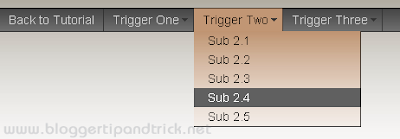


Demo : http://www.projectseven.com/tutorials/navigation/auto_hide/workpage.htm
Article : http://www.projectseven.com/tutorials/navigation/auto_hide/
Download : http://www.projectseven.com/tutorials/navigation/auto_hide/p7exp.zip


CSS3-only horizontal drop line tab menu


Demo : http://www.skyrocketlabs.com/categories/tutorials/css3-only-horizontal-dropline-tab-menu/demo/index.html
Article : http://www.skyrocketlabs.com/articles/css3-only-horizontal-dropline-tab-menu.php
Download : http://www.skyrocketlabs.com/categories/tutorials/css3-only-horizontal-dropline-tab-menu/css3-only-horizontal-dropline-tab-menu.zip


Nicer Navigation with CSS Transitions


Demo : http://www.gethifi.com/blog/nicer-navigation-with-css-transitions
Article : http://www.gethifi.com/blog/nicer-navigation-with-css-transitions
Download : No


Pure CSS Horizontal Menu


Demo : http://devinrolsen.com/wp-content/themes/typebased/demos/css/css-horizontal-menu/WORKS.php
Article : http://www.devinrolsen.com/pure-css-horizontal-menu/
Download : No


DropDown CSS Menu


Demo : http://divitodesign.com/dd-articles/horizontal-css-menu/index.html
Article : http://divitodesign.com/css/how-to-dropdown-css-menu/
Download : http://www.divitodesign.com/dd-articles/horizontal-css-menu/horizontal-css-menu.rar


Pure CSS Menu With Infinite Sub Menus Tutorial


Demo : http://www.devinrolsen.com/wp-content/themes/typebased/demos/css/infinite-sub-menu/
Article : http://www.devinrolsen.com/pure-css-menu-with-infinite-sub-menus-tutorial/
Download : No


CSS3 Dropdown Menu
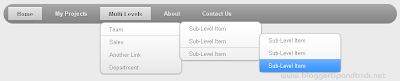


Demo : http://www.webdesignerwall.com/demo/css3-dropdown-menu/
Article : http://www.webdesignerwall.com/tutorials/css3-dropdown-menu/
Download : No


Elegant Drop Menu with CSS Only


Demo : http://aext.net/example/elegant-menu-with-css-only/
Article : http://aext.net/2009/09/elegant-drop-menu-with-css-only/
Download : http://www.box.net/shared/paoqo8y1lt


CSS dropdown menu without javascripting or hacks


Demo : http://www.texaswebdevelopers.com/blog/examples/ddmenu2.asp
Article : http://www.texaswebdevelopers.com/blog/template_permalink.asp?id=129
Download : No


Create Vimeo-like top navigation


Demo : http://www.jankoatwarpspeed.com/examples/vimeo_navigation/
Article : http://www.jankoatwarpspeed.com/post/2009/01/19/Create-Vimeo-like-top-navigation.aspx
Download : http://www.jankoatwarpspeed.com/file.axd?file=2009%2f1%2fvimeo_navigation.zip


ADxMenu


Demo : http://aplus.rs/adxmenu/examples/htb/
Article : http://aplus.rs/adxmenu/
Download : http://aplus.rs/adxmenu/adxmenu-v4.zip


A Great CSS Horizontal Drop-Down Menu


Demo : http://sperling.com/examples/menuh/
Article : http://sperling.com/examples/menuh/
Download : http://sperling.com/examples/menuh/menuh.css


CSS menus


Demo : http://www.howtocreate.co.uk/tutorials/testMenu.html
Article : http://www.howtocreate.co.uk/tutorials/testMenu.html
Download : No


Pure CSS Fish Eye Menu


Demo : http://www.jampmark.com/html+css-techniques-demos/pure-css-fish-eye-menu-demo.html#expandDown
Article : http://www.jampmark.com/html+css-techniques/pure-css-fish-eye-menu.html
Download : http://www.jampmark.com/downloads/javascript-html-css-codes/pure-css-fish-eye-menu.html


A centered menu with gradient and two pointers


Demo : http://www.cssplay.co.uk/menus/two_points.html
Article : http://www.cssplay.co.uk/menus/two_points.html
Download : No


Create an Advanced CSS3 Menu
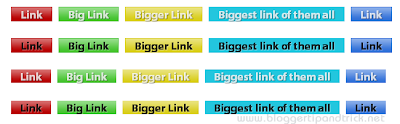


Demo : http://blog.cameronbaney.com/tutorials/cbdb-menu/demo.html
Article : http://blog.cameronbaney.com/tutorials/advanced-css3-menu/
Download : http://blog.cameronbaney.com/tutorials/cbdb-menu/cbdb-menu.zip


Solid Block Menu


Demo : http://www.dynamicdrive.com/style/csslibrary/item/solid_block_menu/
Article : http://www.dynamicdrive.com/style/csslibrary/item/solid_block_menu/
Download : http://www.dynamicdrive.com/cssexamples/media/blockdefault.gif
http://www.dynamicdrive.com/cssexamples/media/blockactive.gif


Sleek Pointer Menu


Demo : http://www.dynamicdrive.com/style/csslibrary/item/sleek-pointer-menu/
Article : http://www.dynamicdrive.com/style/csslibrary/item/sleek-pointer-menu/
Download : http://www.dynamicdrive.com/cssexamples/media/rightround.gif
http://www.dynamicdrive.com/cssexamples/media/pointer.gif


Sleek Pointer Menu 2


Demo : http://www.dynamicdrive.com/style/csslibrary/item/sleek-pointer-menu-2/
Article : http://www.dynamicdrive.com/style/csslibrary/item/sleek-pointer-menu-2/
Download : http://www.dynamicdrive.com/cssexamples/media/rightround2.gif
http://www.dynamicdrive.com/cssexamples/media/pointer.gif


How to Create a CSS Menu Using Image Sprites



Demo : http://line25.com/wp-content/uploads/2009/css-menu/demo/demo.html
Article : http://line25.com/tutorials/how-to-create-a-css-menu-using-image-sprites
Download : http://line25.com/wp-content/uploads/2009/css-menu/demo/awesome-menu.zip


CSS Sprite Navigation Tutorial


Demo : http://www.ehousestudio.com/assets/downloads/sprite/
Article : http://www.ehousestudio.com/blog/view/css_sprite_navigation_tutorial
Download : http://www.ehousestudio.com/assets/downloads/sprite.zip


CSS Overlapping Tabs Menu


Demo : http://www.tutorialsphere.com/homemade/uploads/2009/02/css-overlapping-tabs-menu.html
Article : http://www.tutorialsphere.com/homemade/2009/02/18/css-overlapping-tabs-menu
Download : http://www.tutorialsphere.com/homemade/uploads/2009/02/tabs.gif


CSS Navigation Menus



Demo : No
Article : http://www.jacorre.com/design/cssnavmenus.htm
Download : No


CSS3 Chunky Menu


Demo : http://zubeta.com/demo-menu.html
Article : http://zubeta.com/css3-menu-demo.html
Download : No


Creating a glassy non div navigation bar


Demo : http://www.james-blogs.com/wp-content/tutorials/glassy-nav-tabs/
Article : http://www.james-blogs.com/2009/01/07/creating-a-glassy-non-div-navigation-bar/
Download : http://www.james-blogs.com/wp-content/tutorials/glassy-nav-tabs/nav-tab-bg.png


Centered Tabs with CSS


Demo : http://24ways.org/examples/centered-tabs-with-css/final.html
Article : http://24ways.org/2005/centered-tabs-with-css
Download : No


Apple’s Navigation bar using only CSS


Demo : http://westciv.com/style_master/blog/apples-navigation-bar-using-only-css
Article : http://westciv.com/style_master/blog/apples-navigation-bar-using-only-css
Download : No


Animated horizontal tabs


Demo : http://www.dynamicdrive.com/style/csslibrary/item/animated_horizontal_tabs/
Article : http://www.dynamicdrive.com/style/csslibrary/item/animated_horizontal_tabs/
Download : http://www.dynamicdrive.com/cssexamples/media/tab-blue-right.gif
http://www.dynamicdrive.com/cssexamples/media/tab-blue-left.gif


A Horizontal Button Menu - The Easy Way


Demo : http://www.cssplay.co.uk/menus/listnine.html
Article : http://www.cssplay.co.uk/menus/tutorial.html
Download : No

Twitter Delicious Facebook Digg Stumbleupon Favorites More

 
Design by Free WordPress Themes | Bloggerized by Lasantha - Premium Blogger Themes | fantastic sams coupons